Every Laravel app sends email. Welcome messages, password resets, order confirmations, invoices, notifications. And every team has the same awkward moment: someone needs to see what those emails actually look like before they hit a real inbox.
The usual options are all compromises. The log driver dumps encoded HTML and headers into a file no human wants to read. Mailtrap and Mailhog work, but they mean another signup, another API key, another Docker container, another onboarding step for every new developer. Mail::fake() in tests only tells you a Mailable was queued - not whether the rendered email contains what you expect.
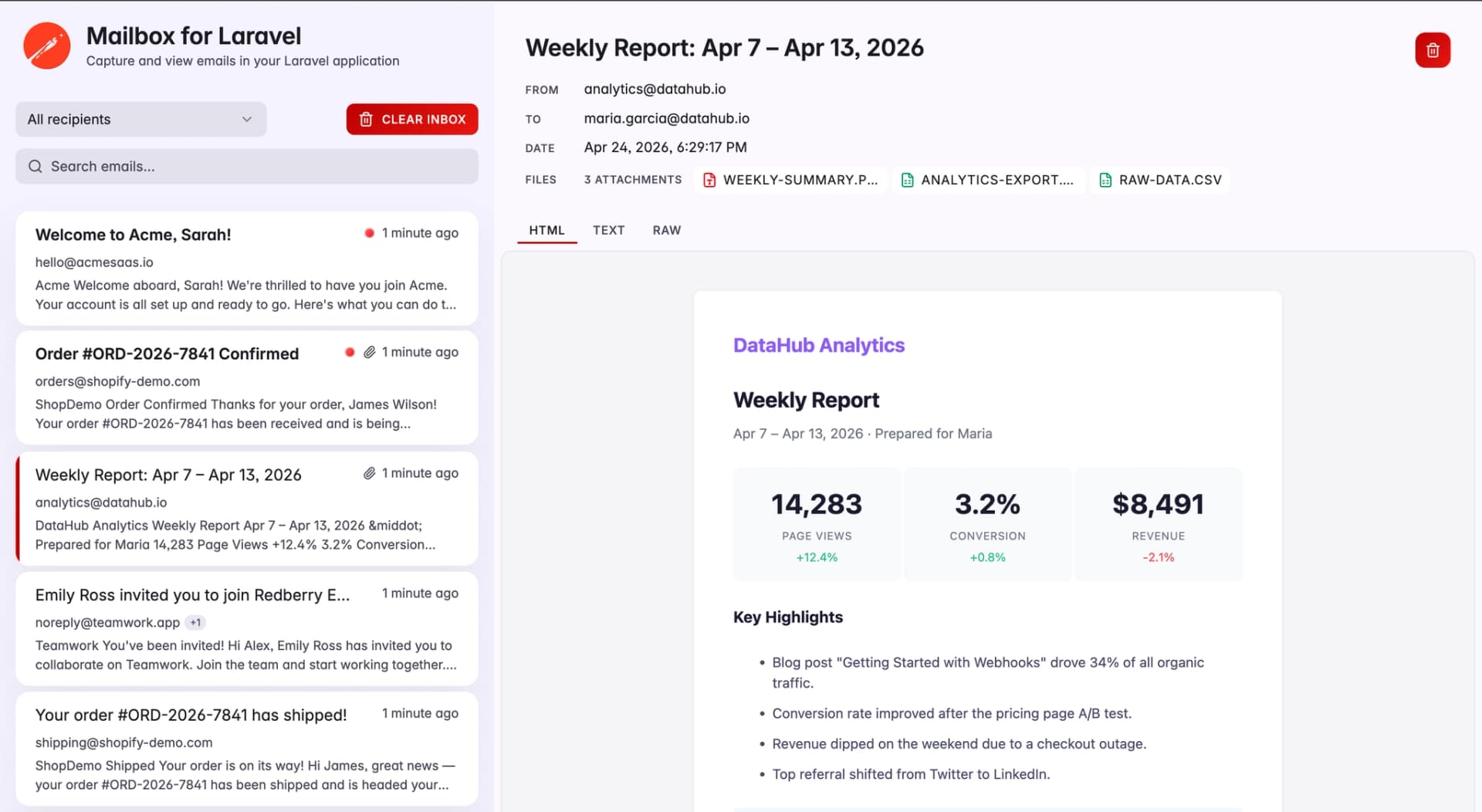
Today, we're open-sourcing Mailbox for Laravel - a Laravel package that captures your app's outgoing mail and serves it through a local, self-hosted dashboard. No external services. No accounts. No second process. One composer require, and every email your app sends is rendered exactly as the recipient would see it at /mailbox.
Why We Built This
At Redberry, we run 30-35 Laravel development projects in parallel. Every project sends transactional email, and every project used to hit the same hurdle: the first time someone touched an email flow, they had to stop and configure a testing tool. Sometimes Mailtrap. Sometimes a local Mailhog container. Sometimes, just the log driver and a lot of squinting.
It wasn't any one of those things that was bad - it was the repetition. Thirty-plus projects, new developers rotating in, staging environments that needed their own setup, CI pipelines that needed a different approach again. We wanted an email inbox that lived inside the Laravel app, shipped with the repo, and worked the same way on a junior developer's laptop as it did on a staging server.
So we built one. And because we believe the broader Laravel community would benefit from it, we're releasing it as an open-source package.
If you're currently using Mailhog with Sail, here's why teams are moving to Mailbox, a persistent, zero-dependency alternative built specifically for Laravel.
What Mailbox for Laravel Covers (Email Testing, Preview & Assertions)
Mailbox for Laravel does three things, and it tries to do each of them well:
- Capture - Every email sent through Laravel's
Mailfacade is intercepted by a custom Symfony transport and stored locally. Works with Mailable classes, notifications, and rawMail::raw()calls. - Preview - A self-contained Vue 3 dashboard at
/mailboxwith HTML / plain-text / raw RFC 822 views, attachment preview and download, recipient filtering, search, read/unread tracking, and live-updating polling. - Assert - A fluent testing API (
Mailbox::firstSent()->assertHasSubject()->assertSeeInHtml()...) that runs against the rendered message - real HTML, real recipients, real attachments - not just the Mailable object.
But the interesting part isn't the feature list - it's how little setup it takes to get any of it working.
How to Test and Preview Emails in Laravel (Step-by-Step)
Let's take a freshly installed Laravel app from "it sends email" to "we have a full inbox and a test suite asserting against real rendered content."
Installing
composer require redberry/mailbox-for-laravel --dev
php artisan mailbox:install
That's it for setup. The install command publishes assets, runs the package's migrations, and creates a dedicated SQLite database at storage/app/mailbox/mailbox.sqlite - completely isolated from your app's main database. The package is auto-discovered, so there's no service provider to register.
Point your mailer at the mailbox transport:
MAIL_MAILER=mailboxNow visit /mailbox. Empty inbox. Ready to receive.
Sending an Email
Nothing special here. Your existing code already works:
Mail::to('user@example.com')->send(new WelcomeMail($user));The mailbox transport intercepts the outgoing message, normalizes it, and hands it to the storage driver. The dashboard's live polling picks it up within a few seconds.
Capturing and Delivering in Parallel
Capture-only is the default, but on staging you often want both - capture the mail for inspection and actually deliver it. Set MAILBOX_DECORATE to any mailer name your app already knows:
MAIL_MAILER=mailbox
MAILBOX_DECORATE=smtp
The service provider resolves the smtp mailer's underlying Symfony transport and wraps it. Every email is captured locally first, then forwarded to the real transport. Works with smtp, ses, postmark, log, or anything registered in config/mail.php.
To go back to capture-only, remove the variable.
The Dashboard
The dashboard is a Vue 3 app served from your Laravel app. Not a separate process. Not a second URL. It lives at whatever prefix you configure - /mailbox by default.
Inside, you get what you'd expect from an email client:
- Inbox list sorted newest-first, with live polling so new messages appear without a refresh
- HTML, plain-text, and raw RFC 822 source views per message
- Attachments with inline image rendering - inline
cid:references are rewritten to work in the browser - Single-message delete, clear-all, and read/unread tracking
- Recipient filtering and search
- A "Send test email" button for one-click smoke tests
The dashboard is fully isolated from your host app's frontend. It runs its own Vue app, builds its own assets into public/vendor/mailbox/, and has zero runtime coupling to whatever you're using for your actual UI - Blade, Livewire, Inertia, React, Vue, or nothing at all.
Storage Drivers
Out of the box, messages go into a dedicated SQLite database that the install command creates for you. No config needed. But if you'd rather use your existing MySQL or Postgres connection:
MAILBOX_STORE_DRIVER=database
MAILBOX_STORE_DATABASE_CONNECTION=mysql
And if none of those fit, implement the MessageStore and AttachmentStore contracts for your own backend - Redis, S3, whatever you need. Both halves of the driver pair are wired through CaptureService, so you never duplicate cleanup logic or touch the HTTP layer from storage code.
Testing
This is the part we're most excited about. Mail::fake() is fine for verifying that something got queued, but it can't tell you whether the rendered email contains what you expect.
If you're thinking about broader testing approaches, we’ve written more about Laravel testing strategies and how to structure reliable test suites.
A broken Blade template, a missing variable, a subject line using the wrong locale - Mail::fake() won't catch any of it. The test passes. The customer gets a broken email.
Mailbox's assertions run against the captured message after Laravel finishes rendering it. Real subject. Real HTML. Real attachments. The same bytes that would have gone to the SMTP server.
Add the InteractsWithMailbox trait to your test - it clears the mailbox before every test and exposes $this->mailbox() for assertions:
Collection-level assertions on the Mailbox facade:
use Redberry\MailboxForLaravel\Facades\Mailbox;
use Redberry\MailboxForLaravel\DTO\MailboxMessageData;

Mailbox::assertSentCount(2);
Mailbox::assertSentTo('user@example.com');
Mailbox::assertNotSentTo('admin@example.com');

Mailbox::assertSent(
    fn (MailboxMessageData $m) => str_contains($m->subject, 'Newsletter'),
    expectedCount: 3,
);
Per-message fluent assertions via firstSent():
Mailbox::firstSent()
    ->assertHasSubject('Order Confirmation')
    ->assertFrom('noreply@shop.com')
    ->assertHasTo('buyer@example.com')
    ->assertSeeInHtml('Order #12345')
    ->assertDontSeeInHtml('error')
    ->assertHasAttachment('invoice.pdf', 'application/pdf')
    ->assertAttachmentCount(1);
An end-to-end test of a signup flow ends up reading more like a specification than a test:
it('sends welcome email with getting started guide', function () {
    $this->post('/register', [
        'name' => 'John Doe',
        'email' => 'john@example.com',
        'password' => 'secret123',
    ]);

    Mailbox::assertSentCount(1);
    Mailbox::assertSentTo('john@example.com');

    Mailbox::firstSent()
        ->assertHasSubject('Welcome, John!')
        ->assertFrom('noreply@myapp.com')
        ->assertSeeInOrderInHtml(['Welcome', 'Getting Started', 'Support'])
        ->assertHasAttachment('getting-started.pdf');
});
Authorization and Production
Captured messages can include password reset tokens, invoice details, and personal data, so Mailbox is off by default in production. The master switch is MAILBOX_ENABLED, which auto-enables in non-production environments only.
Dashboard access is gated through Laravel's Gate system - specifically, the viewMailbox ability. Out of the box, it allows access in local environments. Define your own gate to lock it down:
use Illuminate\Support\Facades\Gate;

public function boot(): void
{
    Gate::define('viewMailbox', fn ($user) => $user?->isAdmin());
}
The package won't overwrite a gate you've defined yourself. For staging, this gives you authenticated-only access without any extra middleware.
Retention
By default, captured messages are pruned after 24 hours. The package auto-registers a daily mailbox:clear --outdated on Laravel's scheduler, so you don't have to wire it up. Tune the retention window via MAILBOX_RETENTION (in seconds), or set MAILBOX_RETENTION_SCHEDULE=false if you'd rather run the purge yourself.
What You Could Build With This
We built it for our own development and staging workflows, but a few patterns have emerged:
- Staging QA - Run Mailbox in capture-and-forward mode on staging. QA sees every email both in their real inbox and in the dashboard, and customer-facing addresses never get accidentally spammed during testing.
- Regression test suites - Replace
Mail::fake()assertions that only check Mailable dispatch with assertions against the rendered message. Catch broken templates, missing variables, and encoding issues before they hit production. - Customer-support tooling - Give your support team a read-only dashboard view on internal environments so they can see exactly what a customer would have received.
- Design review for transactional email - Designers can see rendered HTML emails on a live staging environment without needing a mail client or an inbox of their own.
- CI smoke tests - Use the
sent()collection API to script end-to-end flows that send, inspect, and assert on real rendered mail in CI.
Give It a Try
Mailbox for Laravel requires PHP 8.3+ and supports Laravel 10, 11, and 12. Install it in a minute:
composer require redberry/mailbox-for-laravel --dev
php artisan mailbox:install
Then set MAIL_MAILER=mailbox and open /mailbox in your browser.
Full documentation is in the README on GitHub. If it's useful to you, a star helps others discover it. And if you find a bug or want to contribute, PRs are welcome.
Built and maintained by Redberry, an Official Premier Laravel Partner. If you're building Laravel applications and want to move faster with a team that does this every day, explore our Laravel development services.