15 min read
Laravel AI SDK Is Here - What It Means for Developers (and for LarAgent)
 Laravel just shipped its AI SDK, and it’s one of those releases that feels bigger than a typical feature drop. AI isn’t being treated as an external integration anymore; it’s becoming part of the framework’s core story.
For years, if you wanted to build AI-powered features in Laravel, you had to wire things up yourself: choose a provider, handle responses, manage structure, deal with edge cases. It worked, but it wasn’t native. Now there’s an official, Laravel-style way to interact with LLMs and build agents directly inside your application.
That matters for two reasons. First, it lowers the barrier for developers who want to experiment or ship AI features in real products. Second, it sets a standard for how AI systems should be built in the Laravel ecosystem moving forward.
In this article, we’ll look at what the Laravel AI SDK actually brings to the table, walk through a technical deep dive using a real multi-agent example, and then explore what this shift means for the future of LarAgent.
What the Laravel AI SDK Actually Is?
At its core, the Laravel AI SDK is a native, Laravel-style interface for interacting with LLMs and building AI-powered features inside your application. It supports multiple providers out of the box - OpenAI, Anthropic, Gemini, and others, and abstracts them behind a clean API that feels consistent with the rest of the framework.
But it’s not only about simple text generation.
The SDK includes support for agents, tools, structured output, embeddings, queues, conversation persistence, and even multimodal capabilities like image and audio generation. In other words, it provides the primitives needed to build serious AI features, not just demo chatbots.
And because it’s designed with Laravel conventions in mind, it feels familiar. Configuration is clean. Commands are expressive. Agents are structured. The learning curve is significantly lower than stitching together third-party SDKs manually.
That’s what makes this release important: it aligns AI development with Laravel’s philosophy of productivity and clarity.
A Practical Example: Building a Dual-Agent System
To understand what the Laravel AI SDK enables, it’s better to look at a real example instead of just listing features.
We built a small dual-agent system that does the following:
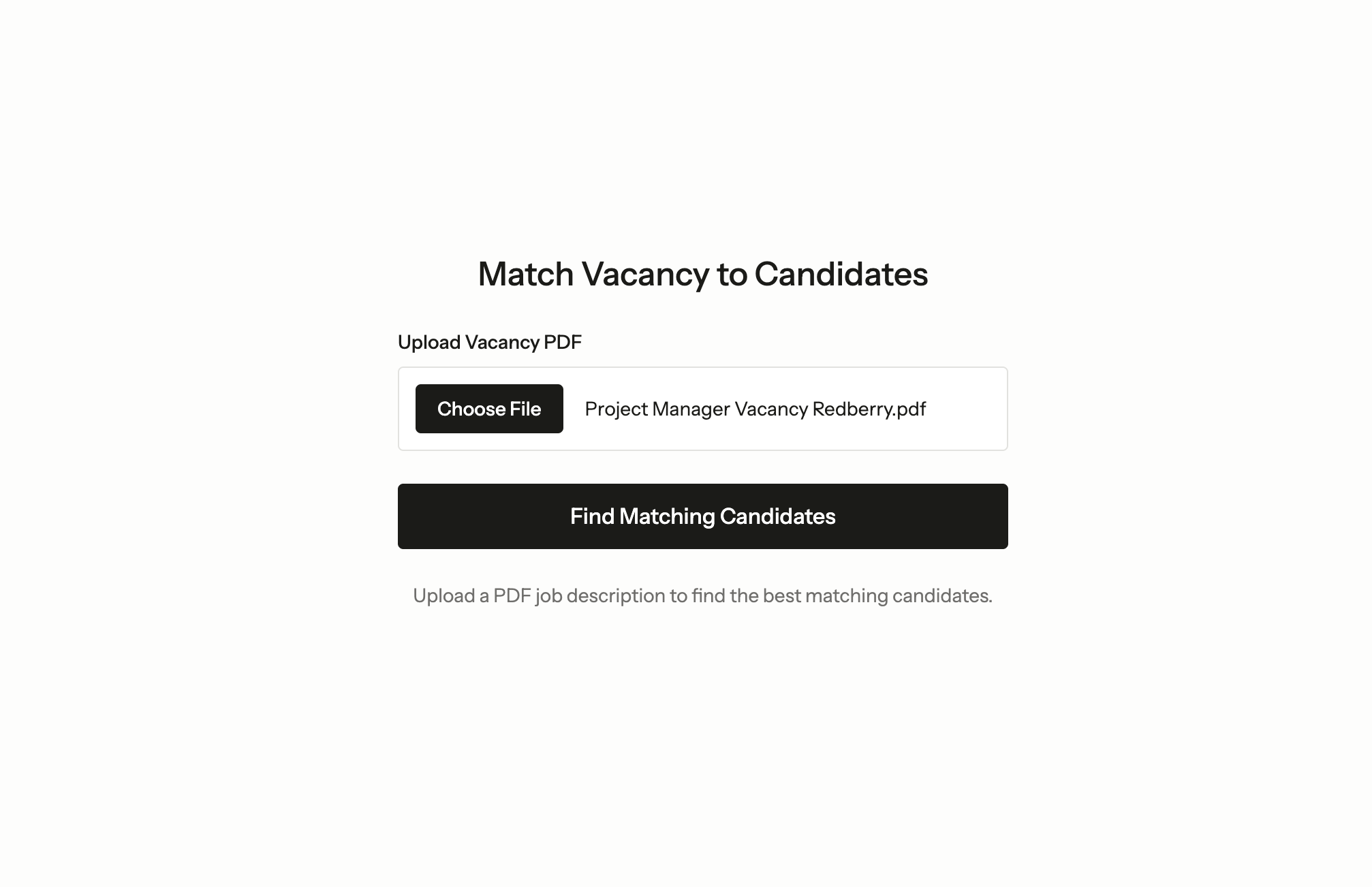
- Upload a PDF containing a job vacancy
- Extract structured requirements from it using a lightweight extraction agent
- Research the company and match top candidates using a second, tool-equipped agent
- Display the results alongside a full AI activity trace
This isn’t a toy chatbot example. It’s closer to how production AI systems are built - multi-step, tool-enabled, and structured. The full source code is available on GitHub. You can also watch video where Revaz - AI Development Lead at Redberry and Gaga - Redberry’s CEO and Founder build this live:
Let’s break down every AI-related piece.
Agent #1: DataExtractor
Laravel provides an Artisan command for scaffolding agents:
php artisan make:agent DataExtractor --structuredThis generates a class that implements the SDK’s agent contracts. Here’s our complete DataExtractor:
#[Model('gpt-5-mini-2025-08-07')]
class DataExtractor implements Agent, Conversational, HasStructuredOutput, HasTools
{
    use Promptable;

    public function instructions(): Stringable|string
    {
        return 'Extract structured data from the provided vacancy PDF
                and return it in the specified format.';
    }

    public function messages(): iterable
    {
        return [];
    }

    public function tools(): iterable
    {
        return [];
    }

    public function schema(JsonSchema $schema): array
    {
        return [
            'company' => $schema->string()->required(),
            'seniority' => $schema->string()->enum(Seniority::cases())->required(),
            'role' => $schema->string()->required(),
            'skills' => $schema->array()->items($schema->string())->required(),
        ];
    }
}
A few things to note here.
The #[Model] attribute on the class specifies which model to use. We chose a smaller model for this agent deliberately - extracting structured data from a PDF doesn’t require heavy reasoning, so there’s no reason to burn tokens on a larger model. This kind of per-agent model selection is one of the SDK’s practical strengths.
The instructions() method defines the system prompt. Clear and focused instructions reduce ambiguity and improve output reliability. For extraction tasks, brevity works in your favor.
The messages() method returns an empty array because this agent is stateless - it doesn’t need conversation history. We’ll touch on persistence later.
The tools() method also returns empty. This agent doesn’t need to call external services; it just reads a PDF and structures the data.
Structured Output: Making AI Deterministic
The schema() method is where things get interesting. Instead of receiving free-form text and hoping for the best, you define a JSON schema that the agent must follow
public function schema(JsonSchema $schema): array
{
    return [
        'company' => $schema->string()->required(),
        'seniority' => $schema->string()->enum(Seniority::cases())->required(),
        'role' => $schema->string()->required(),
        'skills' => $schema->array()->items($schema->string())->required(),
    ];
}
Notice the ->enum(Seniority::cases()) call - the SDK lets you constrain values directly to your PHP enums. The LLM is forced to return one of Junior, Middle, Senior, Lead, or Principal. No fuzzy matching. No post-processing.
This changes how you build AI features. In production, unpredictable text responses are a liability. Structured output makes the system deterministic and machine-friendly.
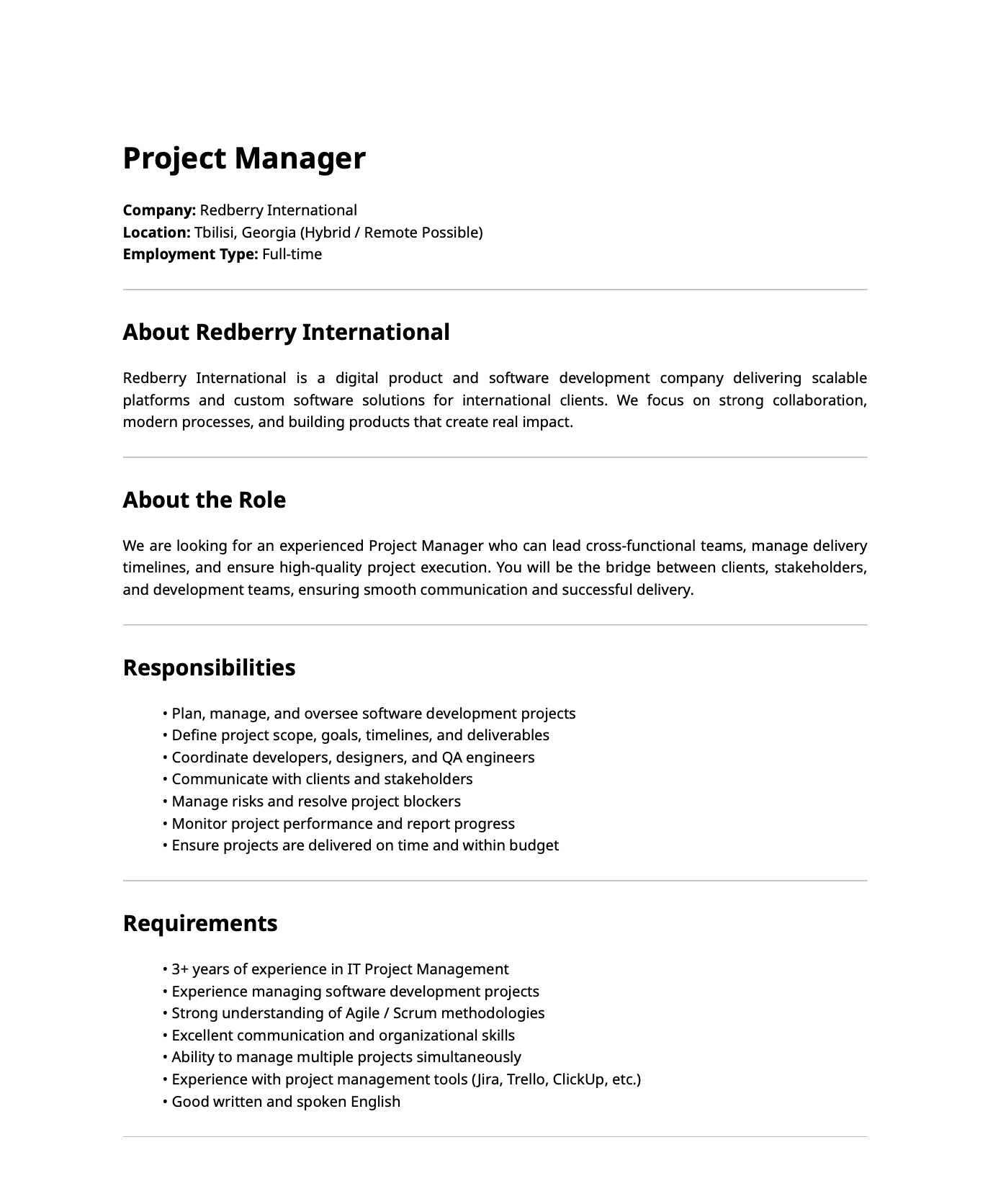
So, you get back a clean, structured, predictable array that represents data from the vacancy (PDF) above, and you can pass it directly to the next step in your pipeline.
Invoking the Agent
With the agent defined, calling it is straightforward:
$vacancy = (new DataExtractor)->prompt(
    'Extract the vacancy details from the attached PDF.',
    attachments: [
        $request->file('vacancy_pdf'),
    ]
);

// $vacancy->structured gives you the typed array
// $vacancy->invocationId gives you a UUID for tracing
The prompt() method (provided by the Promptable trait) accepts an attachments parameter. You pass the uploaded file directly - the SDK handles converting it for the provider. The response object gives you both the structured data and an invocation ID, which becomes important for tracing (more on that later).
{
    "invocationId": "019d6c3d-466e-7062-b593-c098cbc8e47f",
    "structured": {
        "company": "Redberry International",
        "role": "Project Manager",
        "seniority": "senior",
        "skills": [
            "IT project management",
            "Software development project management",
            "Agile",
            "Scrum",
            "Communication",
            "Organization",
            "Multitasking (managing multiple projects)",
            "Project management tools (Jira, Trello, ClickUp)",
            "English (written and spoken)",
            "Risk management",
        ]
    }
}
Agent #2: CandidateMatcher
The second agent is where the system gets more sophisticated. While the first agent is a focused extractor, this one reasons, researches, and uses tools.
#[Model('gpt-5.2-2025-12-11')]
class CandidateMatcher implements Agent, Conversational, HasStructuredOutput, HasTools
{
    use HasRoleSkills;
    use Promptable;

    public function __construct(
        protected array $vacancyData,
    ) {}

    public function instructions(): Stringable|string
    {
        return view('agents.candidate-matcher', [
            'vacancyData' => $this->vacancyData,
            'skills' => $this->formatSkills(),
            'skillsByRole' => $this->getSkillsByRoleAsString(),
        ])->render();
    }

    public function tools(): iterable
    {
        return [
            new WebSearch,
            new SearchCandidates,
        ];
    }

    public function schema(JsonSchema $schema): array
    {
        return [
            'reasoning' => $schema->string()
                ->description('Detailed explanation of why these candidates were selected')
                ->required(),
            'candidateIds' => $schema->array()
                ->items($schema->integer())
                ->description('Array of maximum 3 candidate IDs')
                ->required(),
        ];
    }
}
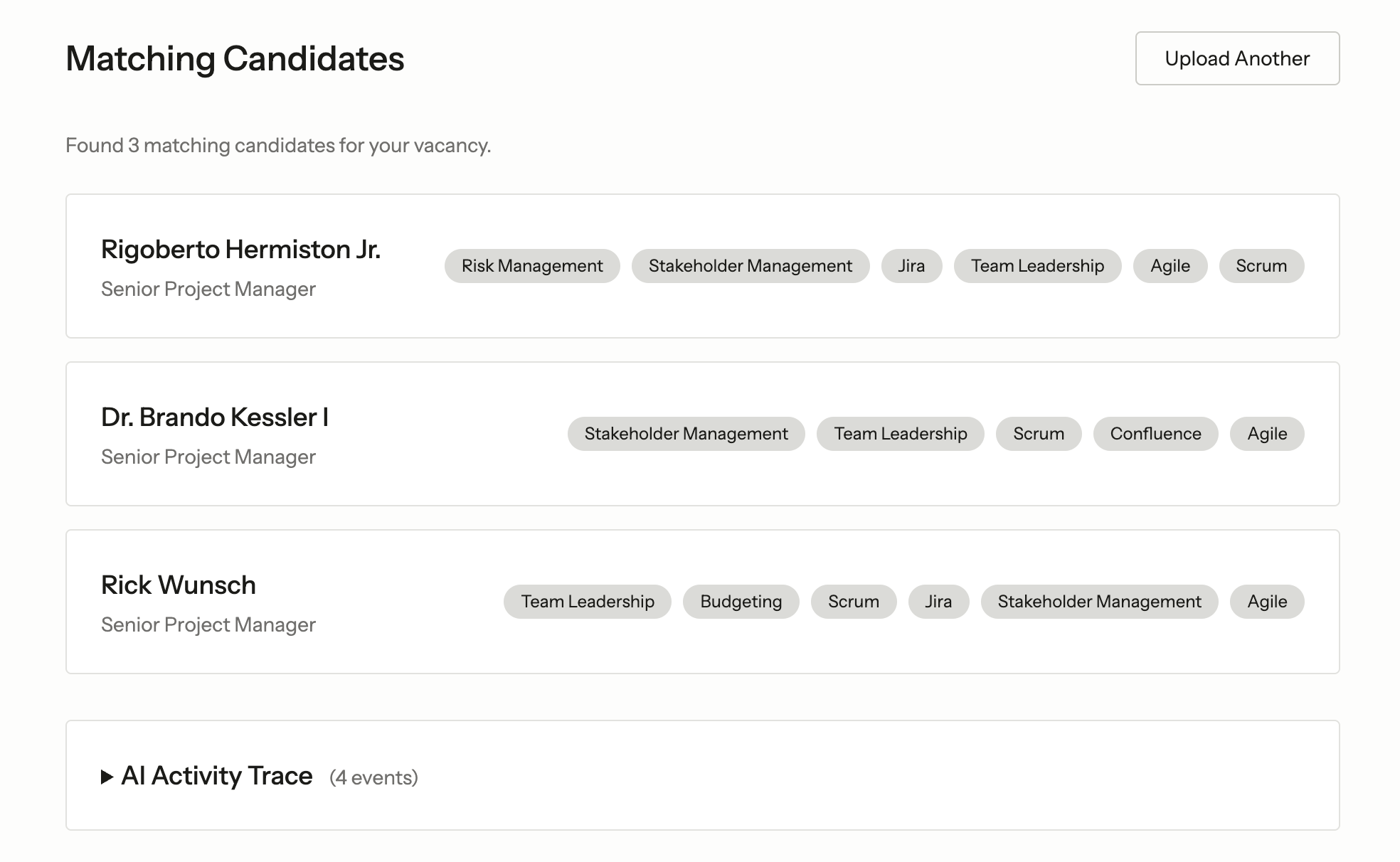
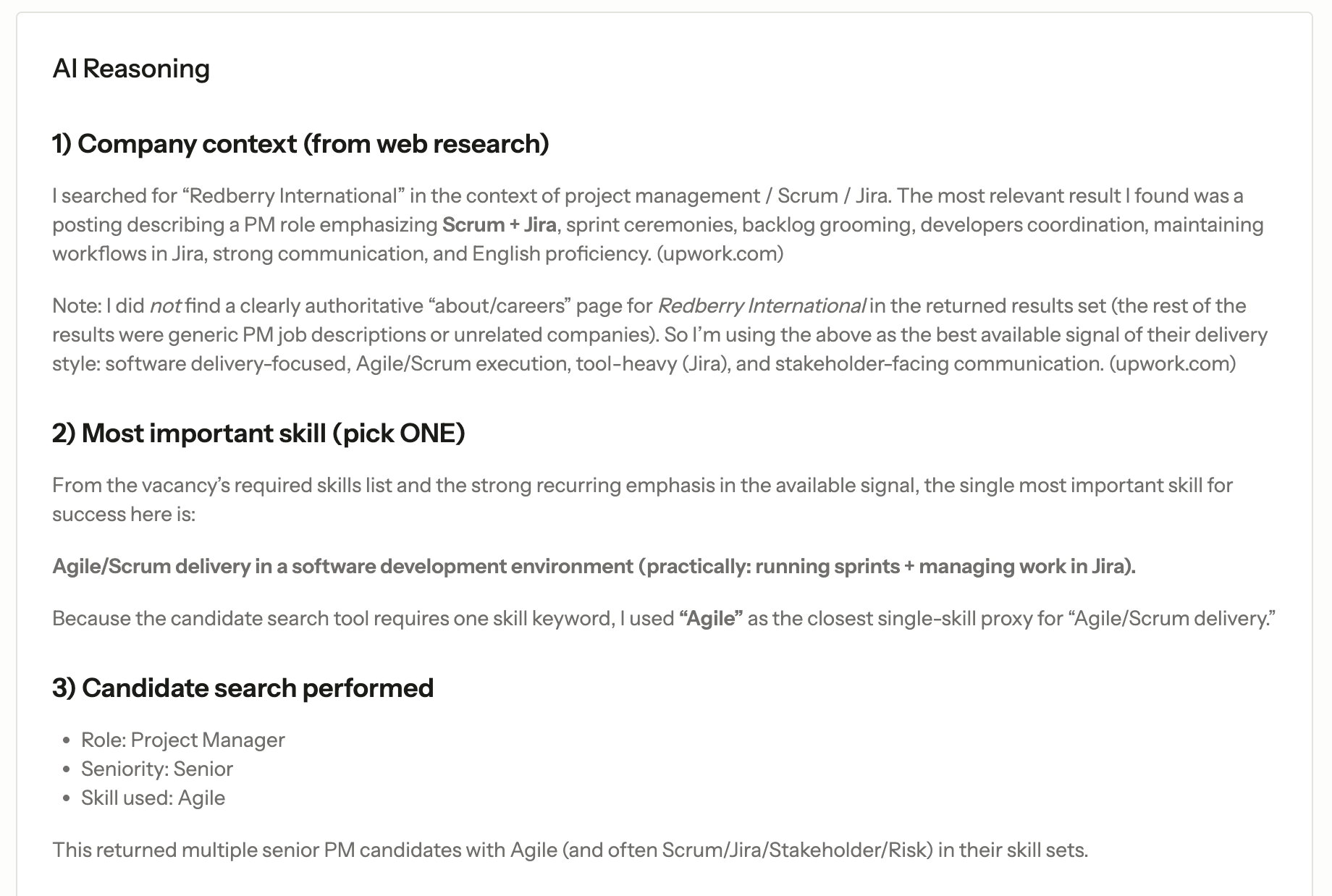
This agent uses a more powerful model because it needs to reason about company culture, weigh skills against requirements, and make judgment calls about candidate fit. And structured output allows us to provide the user with reasoning behind the chosen 3 candidates:
Blade-Rendered Instructions
Here’s a pattern worth highlighting: the instructions() method renders a Blade view.
public function instructions(): Stringable|string
{
    return view('agents.candidate-matcher', [
        'vacancyData' => $this->vacancyData,
        'skills' => $this->formatSkills(),
        'skillsByRole' => $this->getSkillsByRoleAsString(),
    ])->render();
}
The corresponding Blade template:
You are a recruitment assistant that matches job vacancies to candidates.

You have been given vacancy data extracted from a PDF. Your task is to:
1. Use the web search tool to find information about the company.
2. Analyze the required skills and determine which ONE skill is the most important.
3. Use the search candidates tool to find matching candidates.
4. Select a maximum of 3 best matching candidates with detailed reasoning.
5. If no suitable candidates are found, return an empty array and explain why.

Vacancy Data:
- Company: {{ $vacancyData['company'] }}
- Role: {{ $vacancyData['role'] }}
- Seniority: {{ $vacancyData['seniority'] }}
- Required Skills: {{ $skills }}

Available Skills by Role:
{{ $skillsByRole }}
Why use Blade for agent instructions? The same reason you use Blade for anything else in Laravel - when your prompt needs dynamic data, conditionals, or loops, inlining it all in a PHP string gets messy fast. Blade gives you a clean separation between prompt structure and data injection. For complex agents with lots of context, this is a pattern that scales well.
The vacancy data from the first agent flows directly into the second agent’s instructions. The skills-by-role reference gives the LLM a vocabulary to work with, preventing it from inventing skill names that don’t exist in your database.
Invoking With Constructor Dependencies
Because CandidateMatcher requires vacancy data in its constructor, the SDK provides a make() static method:
$result = CandidateMatcher::make($vacancy->structured)
    ->prompt('Find the best candidates for this vacancy.', timeout: 120);
The timeout parameter is important for tool-equipped agents - web searches and database queries take time, and you don’t want the request to die before the agent finishes its work.
Building Custom Tools
Tools are what elevate agents from text generators to systems that do things. The SDK defines a clean contract for tools:
class SearchCandidates implements Tool
{
    public function description(): Stringable|string
    {
        return 'Search for candidates matching the vacancy requirements
                by role, seniority, and skills.';
    }

    public function schema(JsonSchema $schema): array
    {
        return [
            'role' => $schema->string()
                ->enum(Role::cases())
                ->description('Filter by role'),
            'seniority' => $schema->string()
                ->enum(Seniority::cases())
                ->description('Filter by seniority level'),
            'skill' => $schema->string()
                ->description('Filter by the most important skill'),
        ];
    }

    public function handle(Request $request): Stringable|string
    {
        $query = Candidate::query();

        if ($request->has('role')) {
            $query->where('role', $request['role']);
        }

        if ($request->has('seniority')) {
            $query->where('seniority', $request['seniority']);
        }

        if ($request->has('skill')) {
            $query->whereJsonContains('skills', $request['skill']);
        }

        $candidates = $query->limit(10)->get();

        if ($candidates->isEmpty()) {
            return 'No candidates found matching the criteria.';
        }

        return $candidates->map(fn (Candidate $candidate) => sprintf(
            'ID: %d, Name: %s, Role: %s, Seniority: %s, Skills: %s',
            $candidate->id,
            $candidate->name,
            $candidate->role->label(),
            $candidate->seniority->label(),
            implode(', ', $candidate->skills)
        ))->implode("\n");
    }
}
Three methods. That’s it.
description() tells the LLM what the tool does. schema() defines what parameters the tool accepts - again using JsonSchema with enum constraints tied to your PHP enums. handle() executes the actual logic when the agent decides to call the tool.
The beauty is that this is just Eloquent. The tool queries your candidates table, filters by whatever the agent decides is relevant, and returns formatted results. The agent reads these results and incorporates them into its reasoning.
The SDK also ships with built-in tools like WebSearch, which we registered alongside our custom tool. The CandidateMatcher uses it to research the company before making candidate selections - adding real-world context that pure database matching can’t provide.
For reference, our candidate database is seeded with 50 profiles using a factory that assigns realistic skills per role. The agent searches against this pool, not a hypothetical dataset.
Tracing: The Event Subscriber
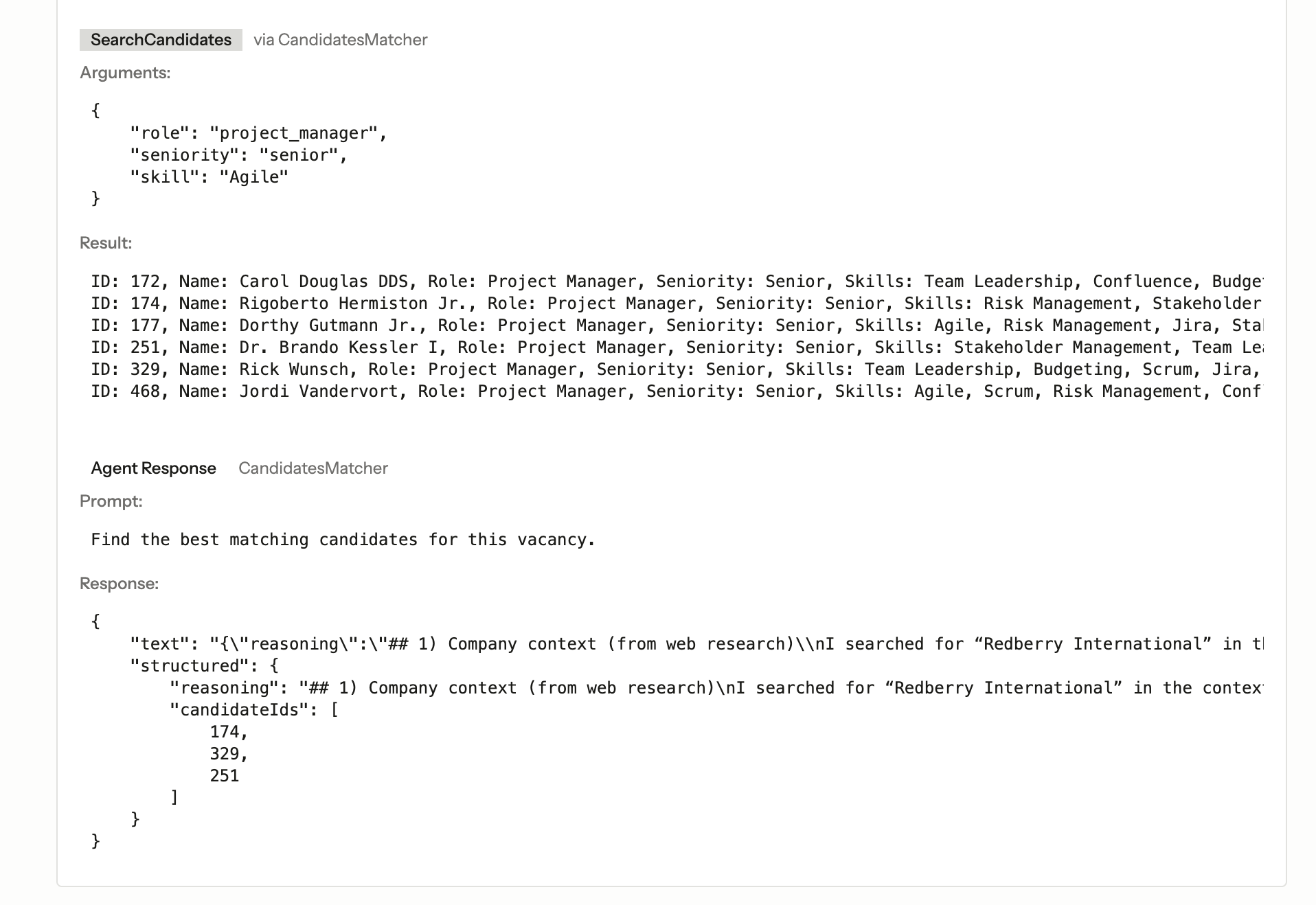
Here’s something the SDK provides that isn’t immediately obvious but is critical for production: a full event system for AI operations.
Laravel AI fires events at each stage of agent execution:
PromptingAgent- before the agent is calledAgentPrompted- after the agent respondsInvokingTool- before a tool is calledToolInvoked- after a tool returns
We built an event subscriber that captures all of this:
class AiEventSubscriber
{
    public function handlePromptingAgent(PromptingAgent $event): void
    {
        Log::channel('ai')->info('Prompting agent', [
            'invocation_id' => $event->invocationId,
            'agent' => class_basename($event->prompt->agent),
            'prompt' => $event->prompt->prompt,
        ]);
    }

    public function handleAgentPrompted(AgentPrompted $event): void
    {
        $agent = class_basename($event->prompt->agent);

        Log::channel('ai')->info('Agent prompted', [
            'invocation_id' => $event->invocationId,
            'agent' => $agent,
            'response_text' => $event->response->text ?? null,
            'structured_output' => $event->response->structured ?? null,
        ]);

        AiLog::create([
            'invocation_id' => $event->invocationId,
            'type' => 'agent_prompted',
            'agent' => $agent,
            'prompt' => $event->prompt->prompt,
            'response' => [
                'text' => $event->response->text ?? null,
                'structured' => $event->response->structured ?? null,
            ],
        ]);
    }

    public function handleToolInvoked(ToolInvoked $event): void
    {
        AiLog::create([
            'invocation_id' => $event->invocationId,
            'tool_invocation_id' => $event->toolInvocationId,
            'agent' => class_basename($event->agent),
            'tool' => class_basename($event->tool),
            'arguments' => $event->arguments,
            'result' => is_string($event->result)
                ? $event->result
                : json_encode($event->result),
        ]);
    }

    public function subscribe(Dispatcher $events): void
    {
        $events->listen(PromptingAgent::class, [self::class, 'handlePromptingAgent']);
        $events->listen(AgentPrompted::class, [self::class, 'handleAgentPrompted']);
        $events->listen(InvokingTool::class, [self::class, 'handleInvokingTool']);
        $events->listen(ToolInvoked::class, [self::class, 'handleToolInvoked']);
    }
}
Every agent call and every tool invocation gets logged - both to a dedicated ai log channel and to an ai_logs database table. Each event carries an invocationId that ties the entire chain together: the prompt, the tool calls the agent made, and the final response.
This is standard Laravel event infrastructure, nothing AI-specific about the pattern. But the fact that the SDK fires these events at the right moments means you get observability for free. You can see exactly what the agent was asked, which tools it chose to call, what arguments it passed, and what it got back.
In our UI, we render this as a collapsible “AI Activity Trace” - a full audit trail of every decision the system made. For a demo, that’s informative. For production, it’s essential.
The Full Execution Flow
When a user uploads a PDF, here’s what happens under the hood:
- DataExtractor receives the PDF as an attachment and returns structured vacancy data (company, role, seniority, skills)
- That structured output feeds directly into CandidateMatcher’s constructor
- CandidateMatcher’s Blade instructions inject the vacancy data into its system prompt
- The agent calls WebSearch to research the company
- The agent calls SearchCandidates with role, seniority, and the skill it determined most important
- The agent returns structured output: up to 3 candidate IDs with detailed reasoning
- Every step is captured by the event subscriber with a shared invocation ID
Two agents. Two tool calls. One structured pipeline. All traceable.
Beyond This Example: What Else the SDK Offers
Our example focused on agents, tools, and structured output - but the SDK’s surface area is broader.
Conversation persistence is built-in. The SDK ships with publishable migrations for storing conversation history in the database. If your agent needs to maintain context across interactions, you return previous messages from the messages() method. We left ours empty because our workflow did not need it, but for stateful assistants or multi-turn workflows, this eliminates the need to build your own memory layer.
Multimodal capabilities go beyond text. The SDK supports image generation, audio generation, and transcription through providers like OpenAI and Gemini. The interface stays consistent regardless of modality.
Embeddings and reranking are available for search and retrieval use cases. The SDK supports multiple embedding providers and includes caching to avoid redundant API calls.
Queue integration lets you dispatch long-running AI tasks to background workers - useful when agent execution involves multiple tool calls and you don’t want to block an HTTP request.
Multi-provider support means switching from OpenAI to Anthropic or Gemini is a configuration change, not a rewrite. Each agent can specify its own model via the #[Model] attribute, so you can mix providers within the same application.
What This Means for LarAgent?
When we began building LarAgent, none of this existed natively in Laravel. We had to build provider abstractions, structured handling, tool execution layers, and conversation persistence ourselves.
The Laravel AI SDK changes that landscape.
With official AI primitives now part of the framework, we can rely on Laravel for the foundational layer and focus LarAgent on higher-level concerns - orchestration, dynamic context management, evaluators, guardrails, trace debugging, monitoring dashboards, and production-oriented workflows.
In other words, instead of maintaining low-level AI plumbing, we can concentrate on building robust agentic systems designed for real-world environments, including regulated industries where reliability and traceability matter.
LarAgent 2.0 will be built fully on top of the Laravel AI SDK. And that’s not a compromise, it’s an upgrade.
Looking Ahead

The introduction of the Laravel AI SDK signals something bigger than a new feature. It formalizes AI as part of the Laravel ecosystem’s core direction.
As more developers experiment with agents, tools, and structured workflows, new conventions will emerge. New architectural patterns will stabilize. And the ecosystem will likely produce higher-level frameworks, orchestration layers, and production tooling on top of this foundation.
We’re excited to be part of that evolution, both by building on top of the SDK and contributing ideas back to the ecosystem.
The primitives are now official. The next stage is building real systems on top of them.

Meet the authors
We are a 200+ people agency and provide product design, software development, and creative growth marketing services to companies ranging from fresh startups to established enterprises. Our work has earned us 100+ international awards, partnerships with Laravel, Vue, Meta, and Google, and the title of Georgia’s agency of the year in 2019 and 2021.