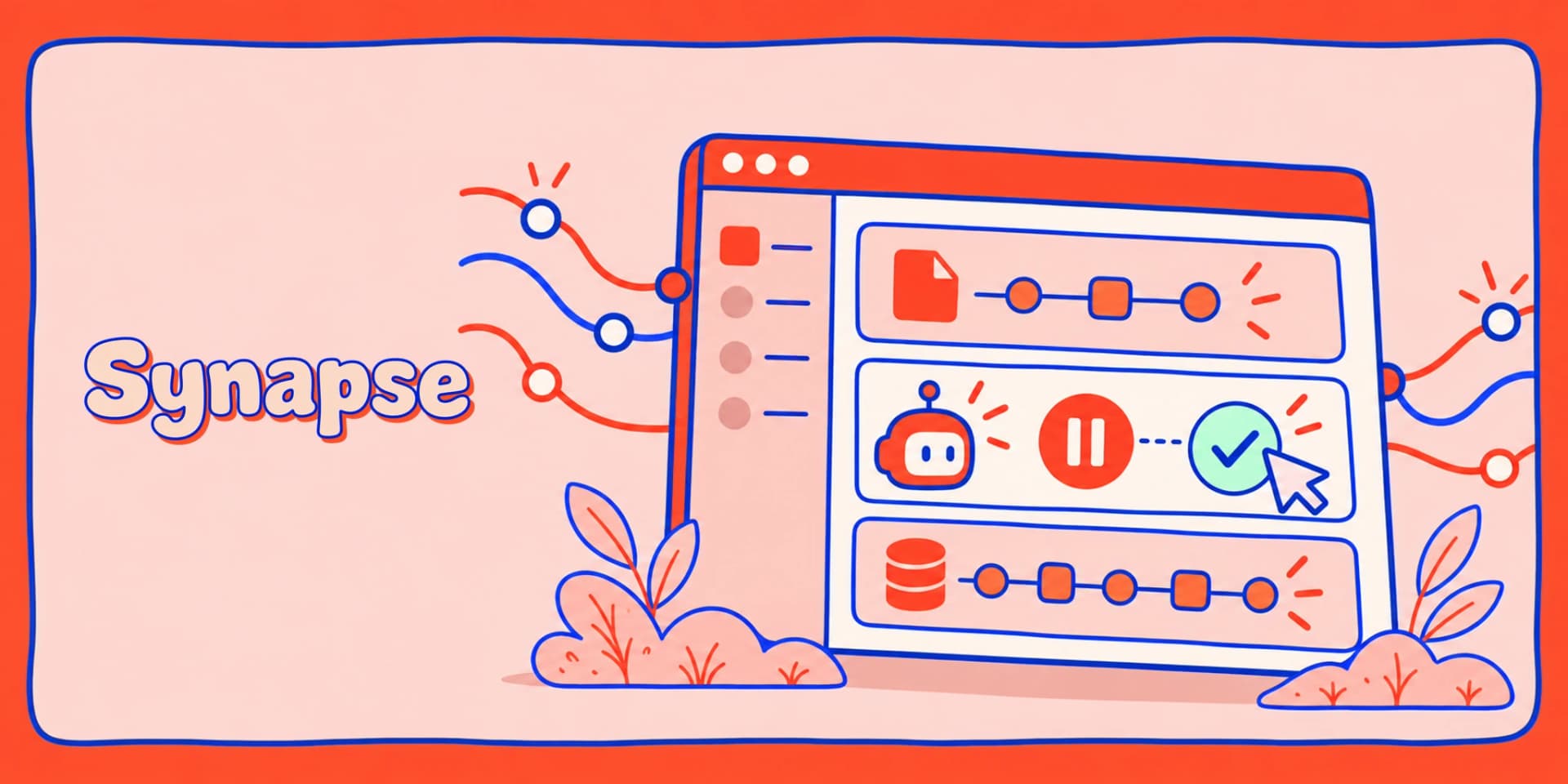
Synapse is our development dashboard for AI agents built with the Laravel AI SDK. Think Telescope and Horizon, but for agents: it finds the agents in your app, lets you chat with them in the browser, and shows what happened underneath - tool calls with their arguments and results, token usage, available reasoning, and errors with their stack traces.
Building an agent is a tight loop: change the prompt, run it, check the tool calls, repeat. We built Synapse to put that loop in a browser instead of tinker and dd().
Versions 0.2.0 and 0.3.0 have changed how much of that loop you can work through in the dashboard. They also landed just three days apart, so we’re covering both in one post.
Version 0.2.0 rebuilt execution, streaming and conversation recording around Laravel AI 1.3. Version 0.3.0 builds on that foundation: you can now approve tools and continue the agent, follow its cited sources, see why an answer stopped, and inspect the model rounds behind it.
One thing first: upgrading from v0.2.0 preserves your history and attachments. The older v0.1.x storage migration needs a reset. Read the version-specific upgrade guide before changing dependencies.
What you see is what the SDK runs
In v0.2.0, we moved Synapse onto the SDK's own execution pipeline. Agent middleware, skills, cache settings and generation options pass through the same SDK path they use in your application.
That matters when you change an agent and try to understand the result. The playground needs to run the agent with those settings intact, so you can inspect the behavior you are actually building.
A pause you can actually continue
The tool card shows the arguments and the reason approval is required. Approve the request or deny it, then continue the agent once every pending call has a decision. The answer carries on in the original turn, with the result on the original tool card.
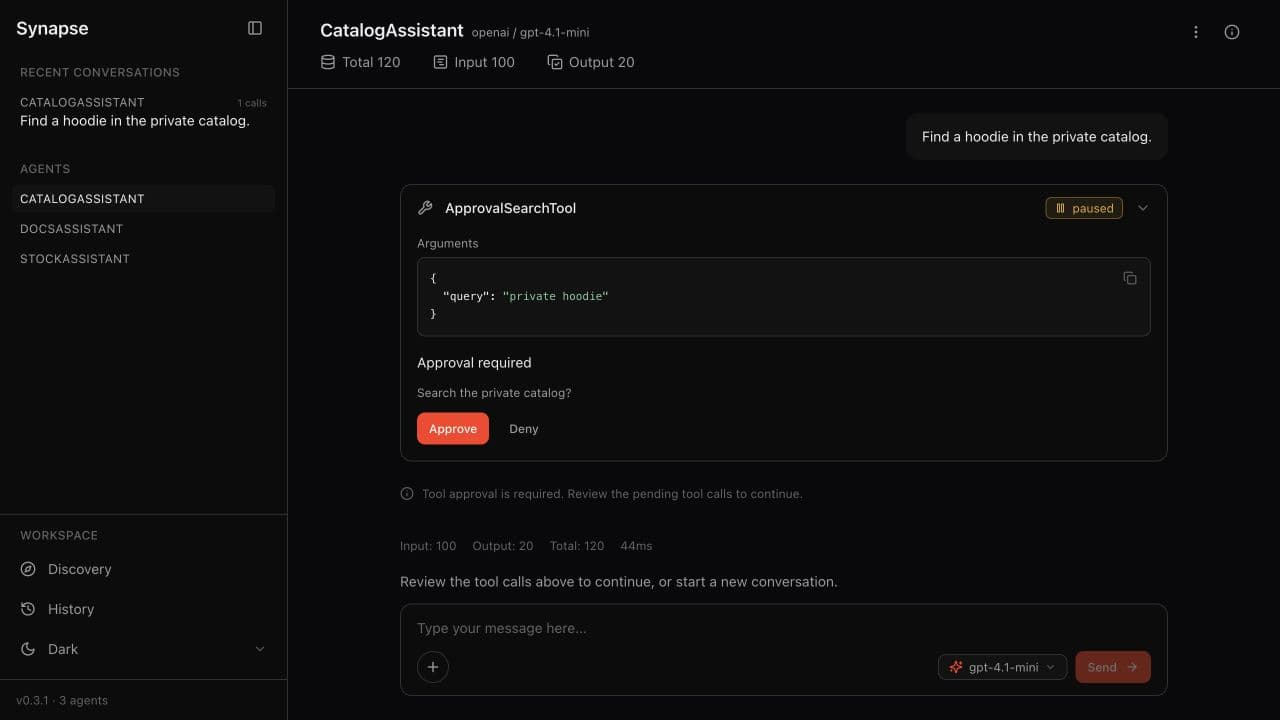
Our test tool uses the SDK’s approval contract and concern:
use Laravel\Ai\Concerns\InteractsWithApprovals;
use Laravel\Ai\Contracts\Approvable;
use Workbench\App\Tools\SearchProductsTool;

class ApprovalSearchTool extends SearchProductsTool implements Approvable
{
    use InteractsWithApprovals;
}
You can refresh the page before deciding, and the approval request is still there.
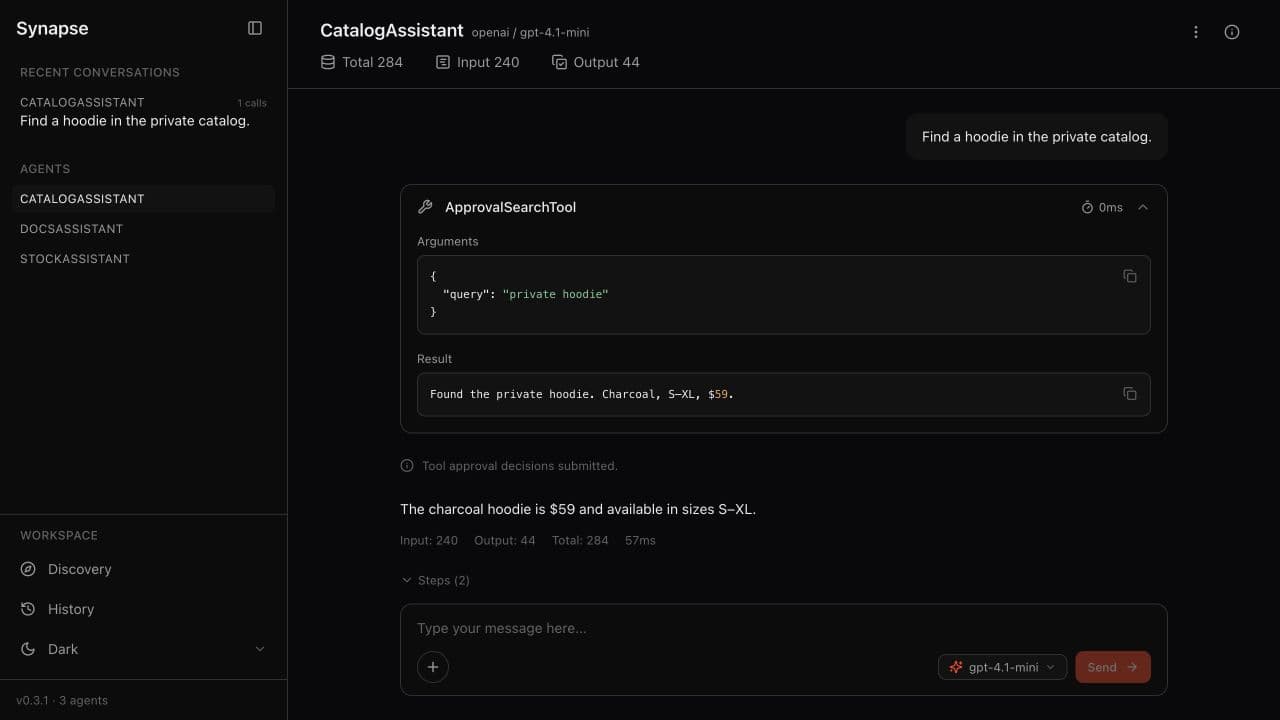
We also check what happens when a decision is submitted twice. One of our regression tests accepts the first submission, rejects the second, and checks that the tool ran once. Another keeps a successful tool result visible when the next provider request fails. A later failure should not erase work that already happened.
This works with custom and SDK tools that support approvals, SDK MCP wrappers, and approval before delegating to a sub-agent. Argument-dependent approval rules are respected. Approvals for provider-hosted tools, and requests originating inside a child agent, remain outside this integration.
Conversations that read the way they happened
An agent turn is rarely just text. It is text, then reasoning, then a tool call, then more text.
The v0.2.0 rebuild keeps those parts in order, both while the response streams and after you reload the page. If a later step fails, the useful partial output stays visible. You do not lose the first half of an answer because the second half threw an exception.
The approval controls in v0.3.0 continue that same turn. You can read the pause, your decision and the result as parts of one conversation.
Sources you can come back to
When a provider supplies URL citations through the SDK, Synapse now shows them as clickable sources beneath the answer.
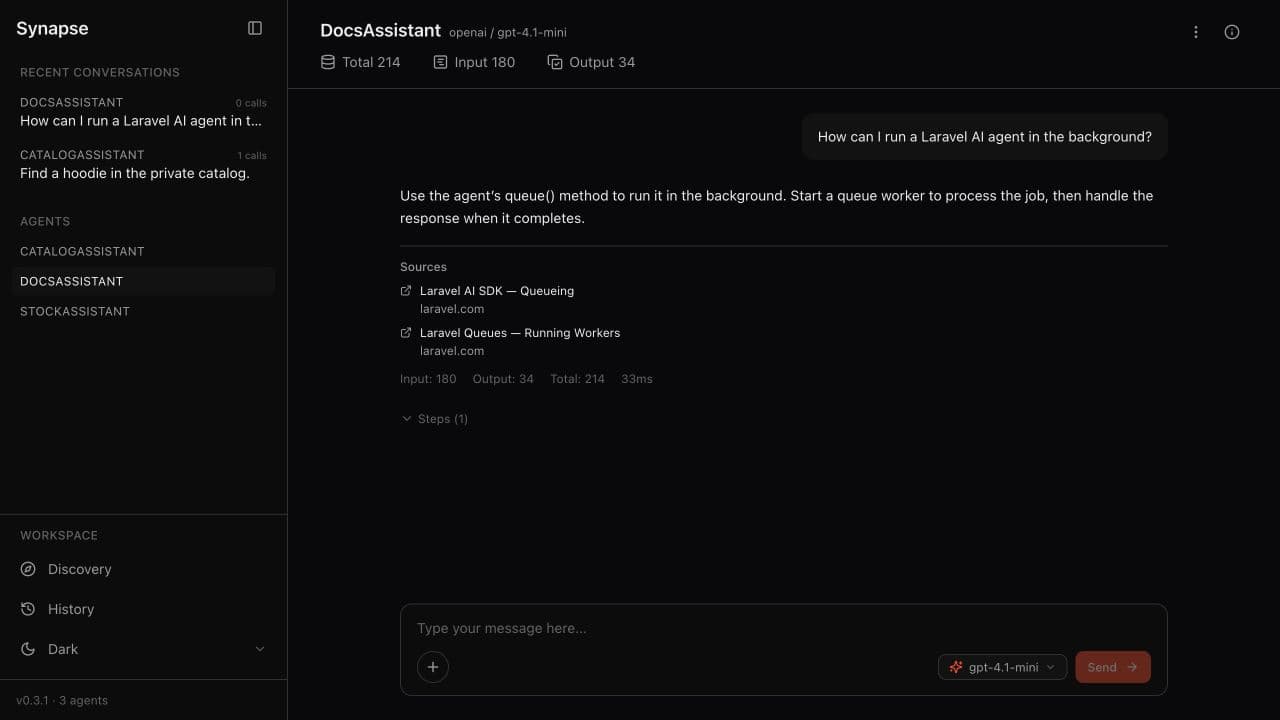
We combine duplicate URLs, use the hostname when a title is missing, and keep the links with the response after reload, approval continuation or partial failure. Valid Unicode URLs are preserved too.
You can follow the reported evidence without digging through the raw provider response. The links still need your judgment: citations show what the provider cited, not whether the answer is correct.
Ordinary links in answer text and tool results are not turned into citations. Inline citation highlighting is outside this release.
When an answer stops, you can see why
A response can stop because it reached its output token limit. It can be content-filtered. The SDK can explicitly report a cancellation.
Those endings now get a short explanation beneath the answer. Partial output stays visible, and the completion outcome does not itself count as an agent failure.
That gives you somewhere to start. If the response ran out of output tokens, look at the budget. If the invocation failed, look at the error. When the finish information was recorded, the same explanation is there after reload.
Normal completions stay quiet.
One answer, several model rounds
A single answer can involve more than one model call, with tool work in between. The total token count tells you what the turn used, but it does not show how that work was split.
We added Steps (N) beneath saved responses so you can open the individual rounds. Each recorded step shows its provider and model, returned text, available reasoning, finish reason, usage, and associated tool calls and results.
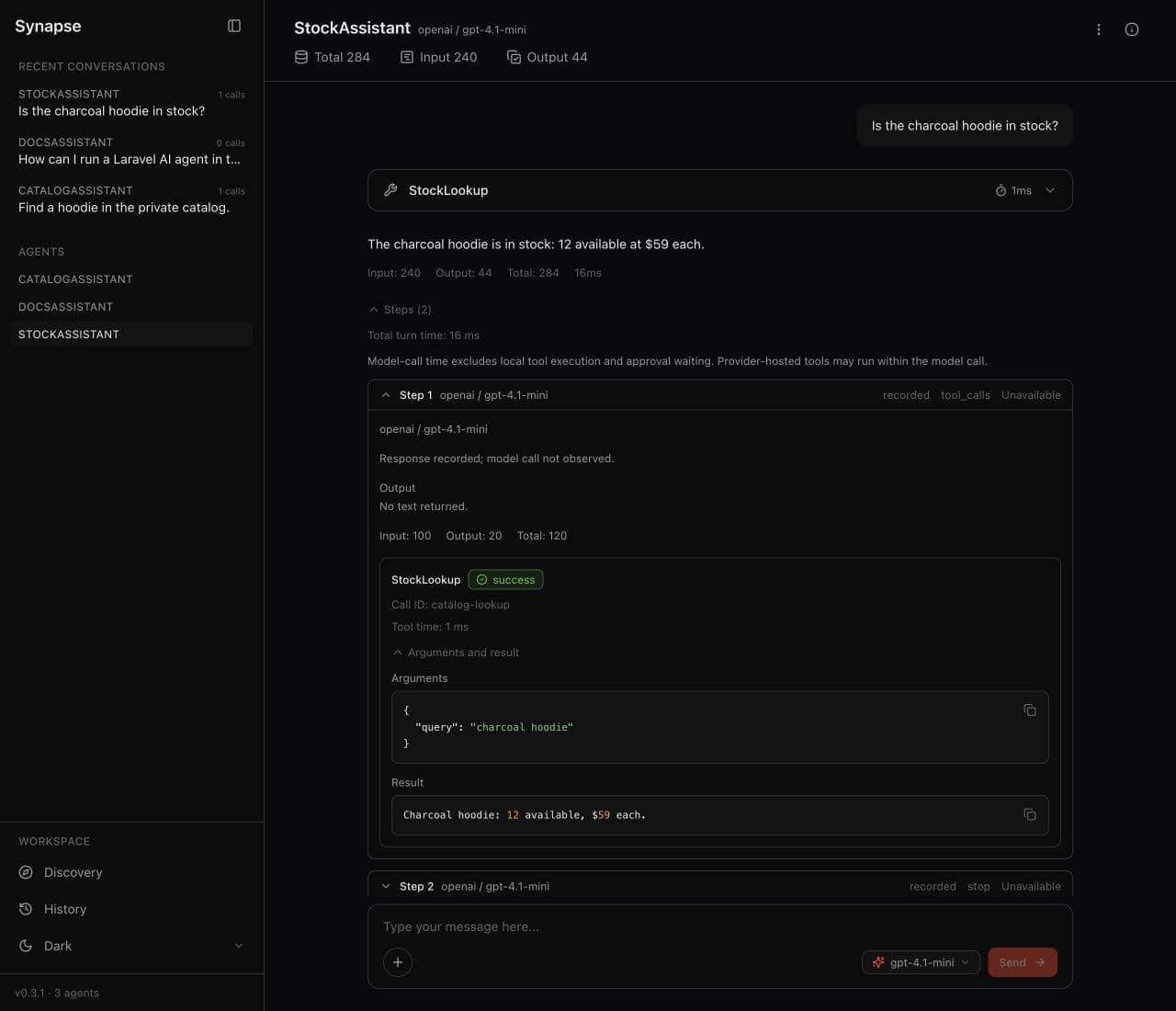
Newly observed model calls also have their own duration, separate from tool execution and total turn time. You can see whether the time went into a model round or a local tool.
The inspector starts collapsed, as do its individual steps. Step order and tool associations survive failover and approval continuation, while aggregate token totals stay unchanged.
Older steps cannot gain timings we never recorded. Missing values stay unavailable, and historical completion evidence is marked unverified.
Discovery that understands modern agents
The v0.2.0 rebuild also brought discovery up to date with the SDK. Synapse recognises skill loaders, wrapped sub-agents, MCP tools, failover provider/model maps and provider-specific settings.
Write the class in a configured discovery path, refresh the page, and Synapse picks it up with the capabilities it resolves through the SDK.
If an agent cannot be loaded, the playground shows an actionable discovery error. Its saved history stays readable.
Usage numbers you can trust
Usage follows the SDK's input and output terminology. Cache usage is included in input; reasoning is included in output. Those breakdowns are already part of the totals, so nothing is counted twice.
Paused and failed turns show their recorded usage immediately, including after you send another message. The new step inspector lets you look inside that total without changing it.
A security floor for MCP
If you install the optional laravel/mcp package, it must resolve to 1.1.0 or later. This retains the patched 1.x floor introduced in v0.2.0 for GHSA-m25c-38v7-94p8.
How we tested it
The v0.3.0 release qualification covered more than the new controls. We checked installation, upgrades, saved conversations and the environments the package supports.
The validation record includes:
- 417 PHP tests and 1,508 assertions in each of eight PHP 8.3/8.4 × Laravel 12/13 × minimum/current framework combinations, plus Pint and PHPStan.
- 126 browser tests and 779 assertions per environment, on Laravel 12 and 13 with PHP 8.4, plus the primary PHP 8.5 environment.
- Separate live OpenAI checks for memory, tools, approvals, output limits, structured output, sources, document upload and reload.
The automated browser suites use fakes. Live provider coverage was OpenAI only; other conditions had deterministic regression coverage.
Requirements
- PHP 8.3+.
- Laravel 12.62+ or 13.15+ for API compatibility. Deploy a current patched Laravel release.
- Laravel AI
^1.3. laravel/mcp1.1.0+ if installed.
Structured output is still single-shot.
Synapse runs your real agents, spends real API credits and executes real tools. Keep it as a development dependency and configure its access gate if you enable it outside your local environment.
Running Synapse with Octane
The dashboard also needs to work with the server your app already uses. v0.3.1 fixes conversation recording in Octane workers, keeping tool results, model-step details and approval continuations attached to the active request.
With Octane on FrankenPHP or Swoole, responses stream incrementally. RoadRunner saves conversations and approval decisions too, but delivers each response at completion; the dashboard keeps its buffering notice. That distinction matters when you are waiting for the next part of an answer.
There are no Synapse-specific Octane listeners or worker settings to add. Use v0.3.1 or later and reload your workers after updating. The patch does not add migrations or reset history.
Upgrading
New installation:
composer require --dev 'redberry/synapse:^0.3.1'
php artisan synapse:install
Then open /synapse. You still do not need an npm build or asset publication; compiled assets ship with the package.
From v0.3.0:
composer require --dev 'redberry/synapse:^0.3.1'No new migrations or history reset are needed. If you run Octane, reload its workers using the engine you actually use:
php artisan octane:reload --server=frankenphp
# Or: php artisan octane:reload --server=swoole
# Or: php artisan octane:reload --server=roadrunner
From v0.2.0:
Back up the database and pause access to Synapse while updating. Explicitly bump the Composer constraint - ^0.2 will not select v0.3.0 - then publish and run the two additive migrations:
composer require --dev 'redberry/synapse:^0.3.1' --with-all-dependencies
php artisan vendor:publish --tag=synapse-migrations
php artisan migrate
php artisan migrate:status
Keep your history and attachments. Do not run synapse:clear for this upgrade. The migrations add approval checkpoints and step observations to Synapse's own tables. SDK conversation tables are untouched.
Old paused turns need a new turn because they have no resumable approval checkpoint. Older history can only show sources, completion explanations and step details where the necessary data was retained.
From v0.1.x:
Follow the legacy migration procedure. That path requires backing up anything you want to keep, then clearing Synapse history and uploaded attachments with the old installation before changing dependencies.
Reach v0.2.0, verify it, then follow the additive upgrade above to install the current v0.3.1 patch. There is no legacy history backfill, and Synapse does not clear or migrate the SDK's own conversation tables. The guide also covers verification, rollback and preserving your access gate.
If you build agents with the Laravel AI SDK, try Synapse on your own agents and tell us what you want to see next in the issues.